
Updated By initdesk TeamCustomer support
Using Linear for customer support tickets (without losing the story)
Learn how to use Linear for customer support tickets: create or link issues from initdesk, preserve customer context, route work, and close the loop.
Short answer: Use Linear for product work, not as the customer inbox. Create or link the issue from the initdesk ticket, include reproducible evidence and customer impact, then keep the support conversation as the place where the customer receives updates and the final reply.
The fastest way to kill a good bug report is to forward an email that says “customer is upset” and nothing reproducible.
Engineering does not need drama. They need signal: what broke, where, and how to see it again. Support already has the customer’s words, what is missing is a habit that turns those words into a Linear issue that stands on its own, while keeping the initdesk ticket as the place the customer gets updates.
That is what initdesk’s Linear integration is for: not “more tickets,” but one thread in email and one object in Linear, linked so nobody re-types the same story in Slack.
Connect once, route every time
Start in Settings > Plugins > Linear Integration and connect your workspace. Then set the boring defaults that prevent chaos later:
- Default Linear team: so “create issue” does not become a routing guessing game at 5pm.
- Title prefix: a short tag like
support:or[cx]makes issues created from the inbox easy to scan in Linear without changing how engineers work.
Those two settings are small, but they answer the question every agent asks silently: “Where does this go?” If you skip them, you will pay the tax in misfiled issues and duplicate work.
For setup details and permissions, use initdesk’s Linear integration guide. The product update that shipped the integration is on initdesk Updates.
Create a new issue vs link an existing one
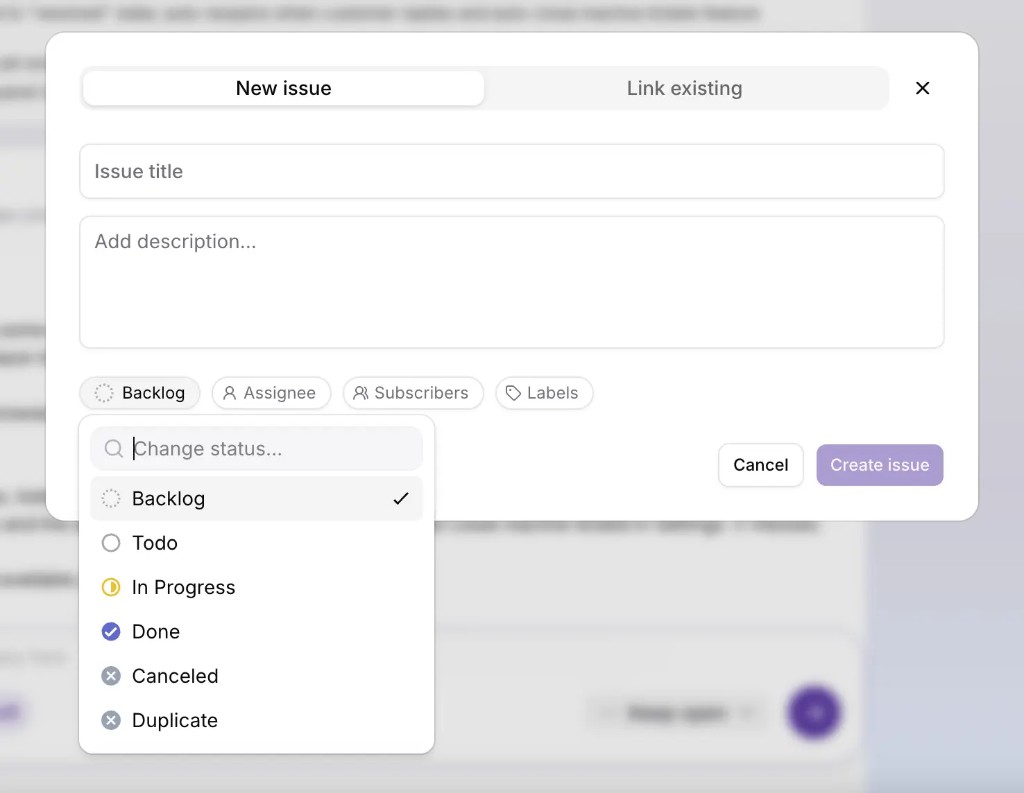
In the ticket sidebar you can either create a new Linear issue or attach the ticket to an issue that already exists. A simple rule of thumb:
- Create when you have a new defect, a new request, or a thread that deserves its own scope in Linear.
- Link when engineering is already tracking it, your job is to attach evidence (customer impact, examples, urgency) without spawning a second ticket nobody will merge.
Linking is how you avoid the classic failure mode: three agents each open “Export fails for EU customers” because nobody searched Linear first. If your team is tiny, a five-second search in Linear before creating still beats triage theater later.
What belongs in the initdesk ticket before you click “create”
Think in two layers: what the customer should read and what product should read.
Customer-facing reply should stay calm and specific: what you need from them (if anything), what happens next, and realistic timing if you can offer it. If you are still investigating, say so in plain language, mystery is what drives reopen loops.
Internal notes (or a tight addendum only the team sees) should hold the handoff payload:
- Repro steps numbered, including account type, plan, or role if it matters.
- Environment: browser or app build, OS, approximate time of failure.
- Expected vs actual in one line each, engineers scan for that pattern fast.
- One screenshot or short clip when the UI is the evidence; avoid ten attachments nobody opens.
- A link to the customer message is automatic in spirit when the issue is created from initdesk, what you add is the interpretation that turns noise into a test plan.
When you create the issue from initdesk, the flow supports the fields product teams expect, team, status, assignee, subscribers, labels, title, and description, and can include ticket context plus a reference back to the support conversation. Your goal is to make the Linear issue readable without opening email, while email remains the customer’s home.
Keep internal notes honest (and slightly boring)
The tone work in From founder-led support to a repeatable voice still applies: internal notes are where you translate a frustrated paragraph into facts.
- Prefer “Steps 1–4 reproduce on Chrome 124, logged in as admin” over “clearly broken.”
- If you are not sure it is a bug, say “needs repro on our side” and name who owns the next check.
- If it is a documentation gap, say that, otherwise engineering chases a ghost while the real fix is a help article update, which pairs naturally with Self-service that actually gets used.
Close the loop when Linear moves
A linked issue is not done until the customer knows what changed. The habit that scales:
- Watch the issue state you care about (fixed, shipped, won’t fix) and decide what each means in customer language.
- Reply once with what shipped, what did not, and the next step, especially for “won’t fix,” where a clear reason prevents reputational damage.
- If you shipped a behavior change, update the help center the same week so the next ticket does not start from zero.
initdesk keeps support and product tied together: the conversation that started the work should still be the conversation that finishes it, with Linear carrying the engineering narrative in between.
A fifteen-minute Monday pass (small teams)
If handoffs feel mushy, do not add a committee, run a tight review:
- Open Linear issues created from support this week. Do any titles still read like inbox subject lines instead of symptoms?
- Pick three linked tickets. Does each issue description contain repro, environment, and expected vs actual?
- List issues closed as shipped. Did every matching ticket get a final customer reply?
If the answer to (3) is “sometimes,” that is not a tooling gap. It is a loop gap. The integration already did the hard part: connecting the systems. The easy part is a message back to the human who reported it.
initdesk is an AI help desk for small teams: shared inbox, Help Center, and optional Linear workflow so customer threads stay tied to product work. See Product Updates for what shipped recently, and the Linear integration guide for connection and field-level behavior. Questions or war stories welcome on X @initdeskhq.