Back

Product Updates

New features, improvements, and fixes shipped to initdesk.

New Feature

Customer ticket access in the Help Center

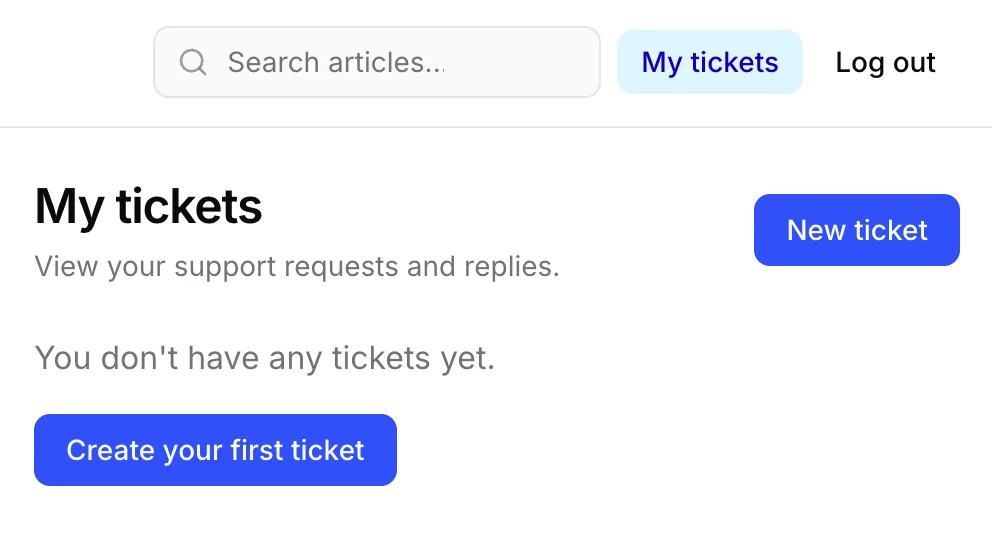
Customer ticket access is available in Help Center settings. Turn it on to let customers sign in by email and view their own tickets and messages.
This is separate from publishing your Help Center. You can keep articles and search public while choosing whether customers can access their ticket history, roll out the signed-in area gradually, or disable login without taking your knowledge base offline.
When enabled, customers sign in with a one-time code sent to their email, then open their ticket list and read each conversation in the Support Portal. They only see tickets tied to their own account.
Go to Help Center → Interface settings, enable Customer ticket access, and click Save changes.
Help Center interface settings showing the Customer ticket access option to let customers sign in by email and view their own tickets and messages
Enhancement

Attach files to internal notes

You can now attach files to internal notes, so teammates can share screenshots, logs, and other diagnostic context without sending anything to the customer.
Open a ticket, switch to Internal note, and use Attach files to add what your team needs. Attachments stay inside the ticket thread and remain visible only to your organization.
This makes handoffs, escalations, and troubleshooting faster when the useful context is a file, not just text.
New Feature

Working language for AI overview

You can now set a Working language for your organization so the AI overview on each ticket is written in the language your team works in.
initdesk is built for global teams, and global teams still usually share one official working language. Customers can write in any language. Ticket language stays for the conversation and customer-facing drafts. Working language is the shared language for the AI overview associates see.
Admins and account owners can change it in Settings > General. Choose English, Spanish, French, Dutch, or Portuguese (Brazil). Changing the language does not rewrite overviews that already exist. As tickets receive updates, their AI overview is rewritten in the new language.
AI overview on a ticket written in Spanish
New Feature

Snooze tickets until follow-up time

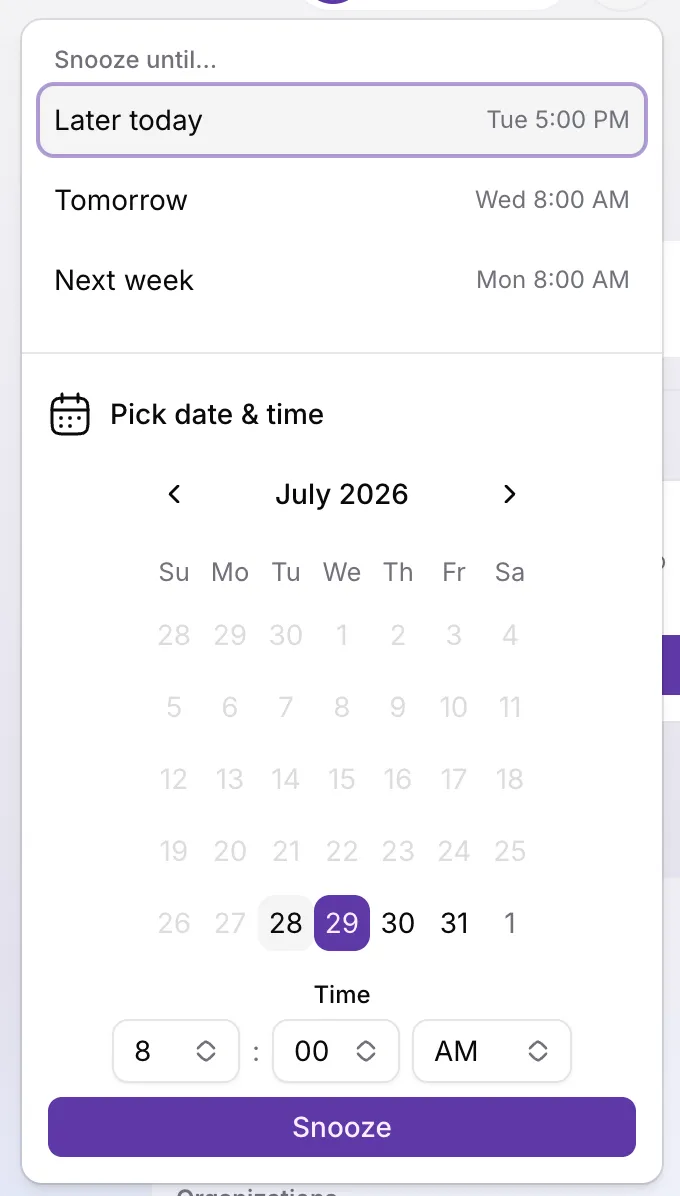
You can now snooze open tickets until a follow-up date and time you choose. Snoozed tickets leave your open-work queues but stay open, and customers never see that a ticket is snoozed.
Use snooze when you will follow up later, when you are waiting on an external event, or when you want a deliberate pause without closing the conversation. Pick a time up to 90 days ahead from Snooze on the ticket page (top right) or from the right side of the inbox filter bar. Reschedule by snoozing again, or bring a ticket back early with Unsnooze.
Open the fixed Snoozed inbox tab to review parked tickets and when each one returns. When the timer ends, the ticket comes back as needing a response and the assignee and snoozer get an in-app notification. Customer or CC replies clear snooze immediately so nothing is missed.
For setup, edge cases, and how snooze interacts with auto-close, see Snooze a ticket. For a practical walkthrough and triage habits, see Snooze a ticket until follow-up time.
Snooze until dialog with preset options Later today, Tomorrow, and Next week, plus a date and time picker
New Feature

Customizable preset filters for every organization

The fixed Focused, Waiting Customer, and Closed tabs give way to customizable organization-shared filters. Every organization starts with a predefined set that matches how small teams already triage, and you can rename, reorder, edit, or delete those filters.
The starting predefined filters include My queue (assigned to you and waiting on an associate), Unassigned (no assignee, waiting on an associate), Needs response (waiting on an associate), Waiting on customer, and Closed. Live ticket counts show on the first four by default; Closed hides the count so a large archive does not dominate the filter row. Assignee, Tag, and Spam controls stay as they are today.
When you open the inbox, initdesk prefers My queue. If that view has zero tickets, it falls back to Needs response. If either predefined filter was renamed or edited so it no longer matches the original criteria, it behaves like any other custom filter with no special fallback.
You can still create personal filters for your own workflow. They appear under My filters, before the Shared predefined filters. Reorder within the same band only: admins and owners manage shared order, and each associate manages their own personal filters.
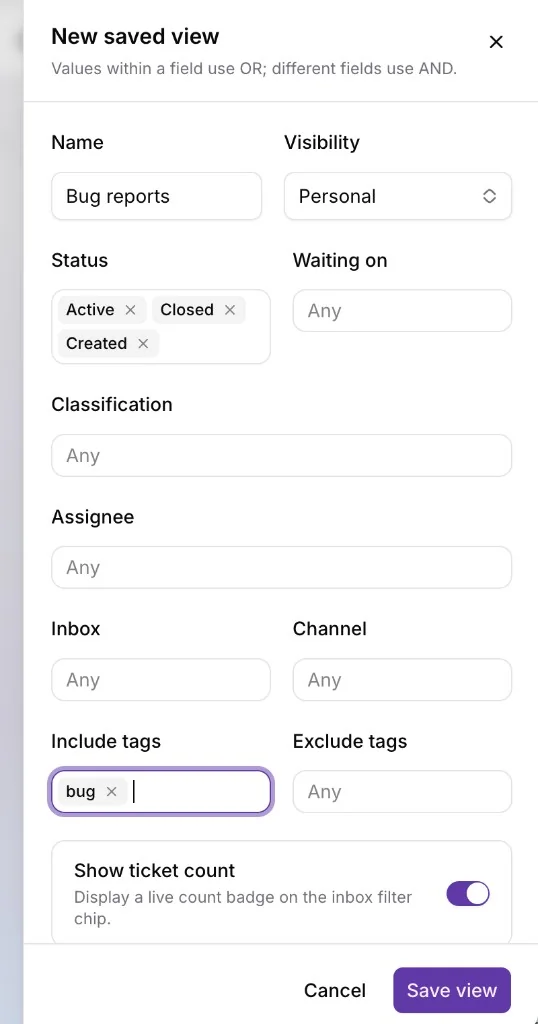
For example, save a personal Bug reports view that includes the bug tag and shows a live count, so issue reports stay one click away without changing the team’s shared map.
New saved view dialog creating a personal Bug reports filter with include tags set to bug and Show ticket count on
For a practical walkthrough of the predefined filters, landing behavior, and personal vs shared filters, see Predefined inbox filters for small teams.
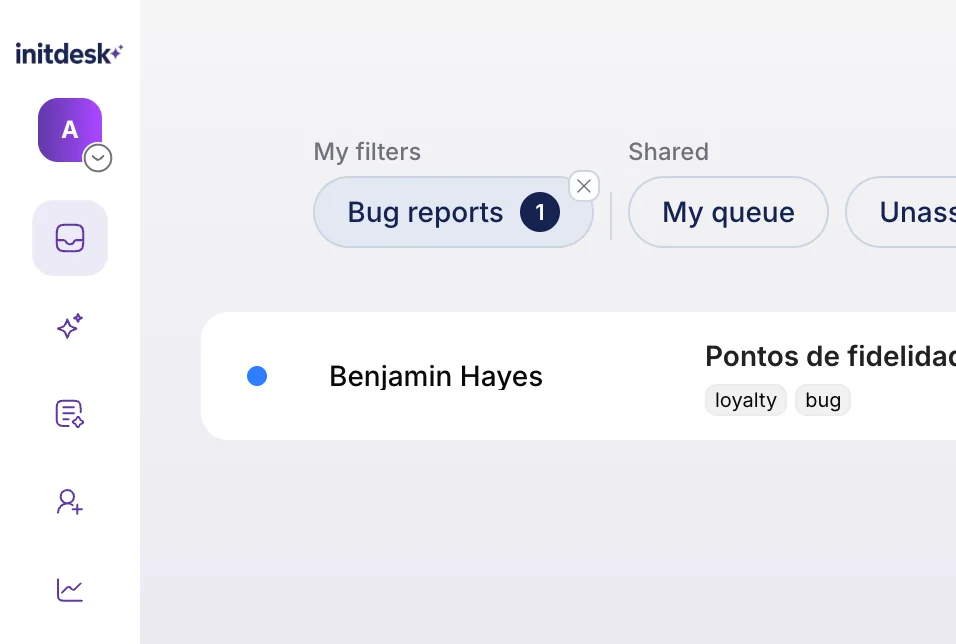
Inbox filter row with My filters showing a personal Bug reports tab with a live count, and Shared showing My queue and Unassigned
New Feature

Change the requester on an email ticket without losing the conversation

Associates can now change the requester (customer) on an email ticket when the wrong person was attached—without recreating the ticket or losing the conversation history.
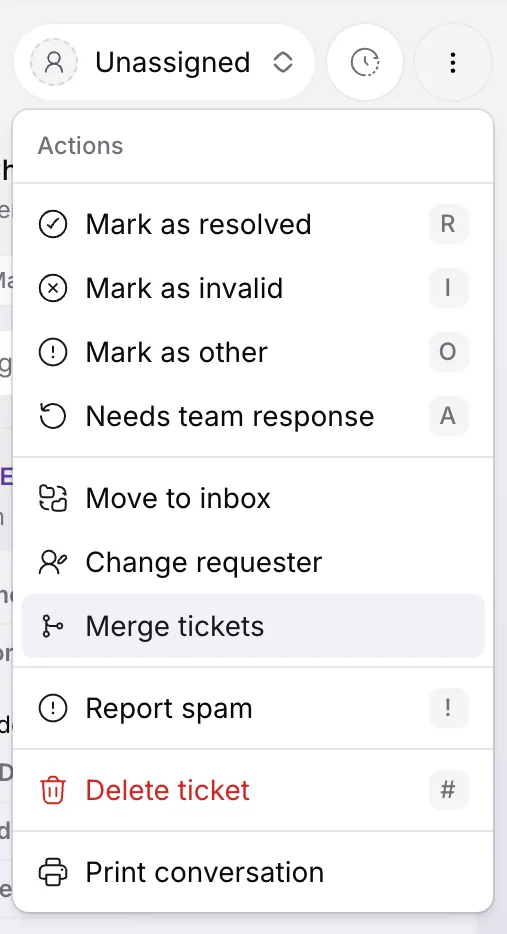
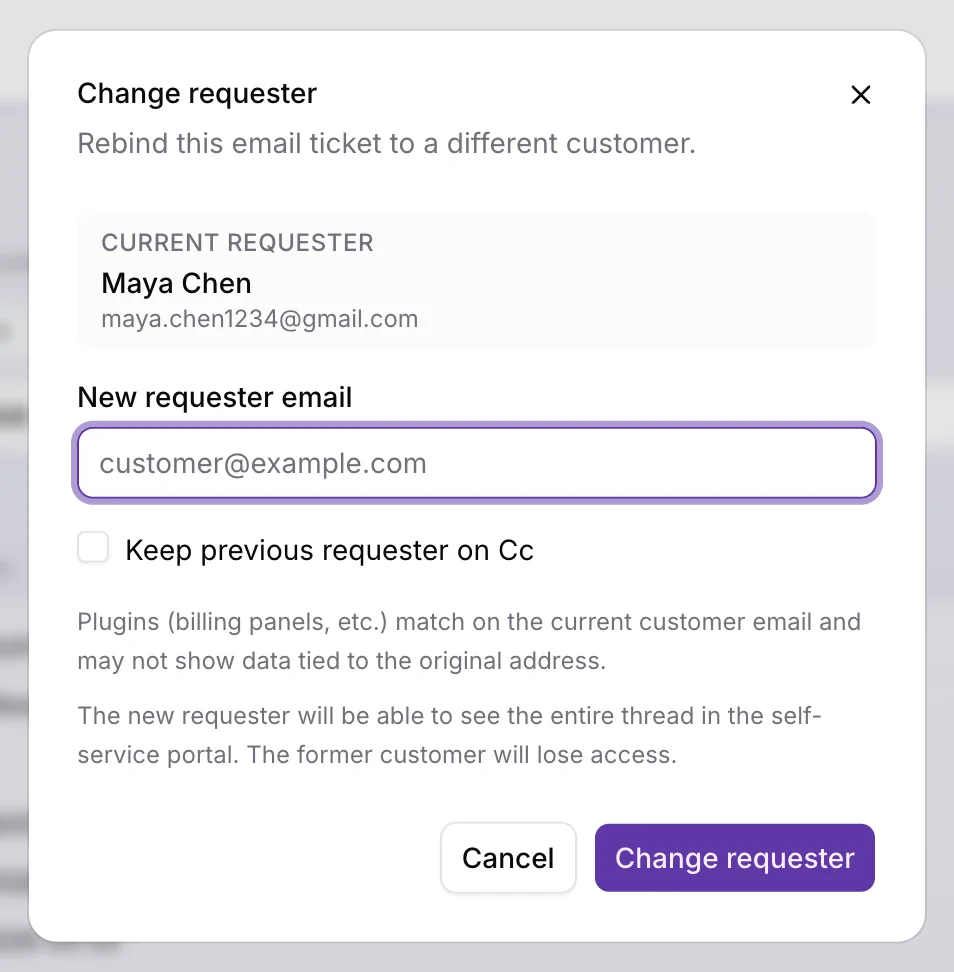
Open an email ticket, open the ⋯ Actions menu in the top right of the ticket screen, choose Change requester, review the current requester, and enter the new customer email (pick an existing customer or create one with a required name). Confirm to rebind the ticket. initdesk keeps the full thread, adds an internal system note documenting the change, and refreshes sidebar context, plugins, recent tickets, and the reply To address for the new identity.
If your organization has CC email routing enabled, you can optionally check Keep previous requester on Cc (off by default). The action is email-only and follows the same inbox access rules as other private ticket actions. It is not available on trial organizations—contact support if you need it during trial.
Use this when a colleague forward, shared inbox address, or early triage mistake stuck the wrong customer on the ticket. Be careful when plugins are keyed to the current customer email, and when self-service is enabled: the new requester gains portal access to the entire thread, and the former requester loses it.
Change requester modal showing the current requester, new requester email field, Keep previous requester on Cc checkbox, and Change requester button
New Feature

Insert saved replies from the ticket composer

You can now insert saved replies from the ticket composer, so your team can answer recurring questions with consistent wording without retyping the same message.
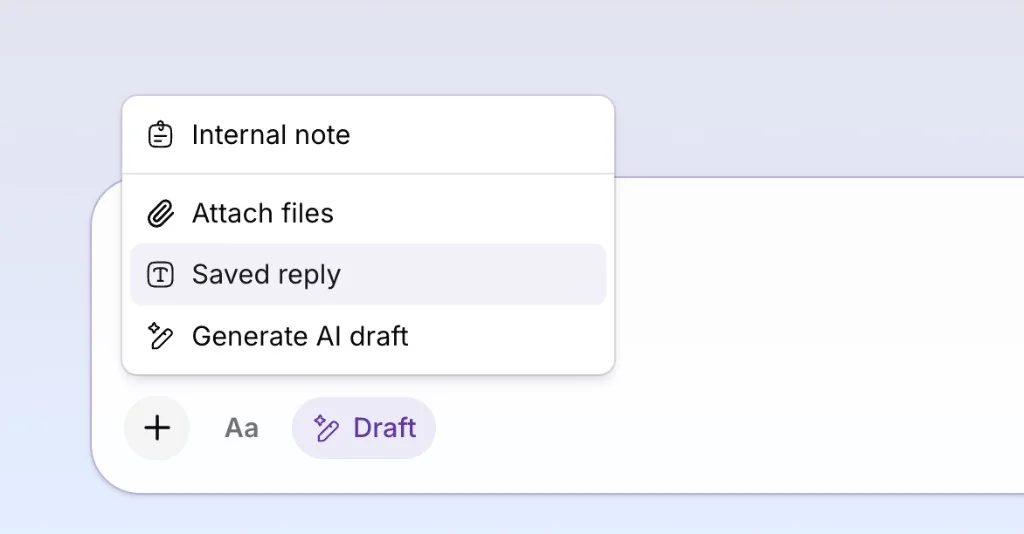
Open a ticket, choose a saved reply, and initdesk fills the composer with the current customer name, your name, and ticket reference. Edit the draft if you need to, then send as usual. Replies can be personal or shared across your organization, and you can limit templates to specific channels such as email, Telegram, or WhatsApp.
A saved reply can also pre-select a close action when sent, which is useful for common wrap-up messages. Go to Settings > Saved Replies to create and manage templates, or insert one from the composer on any ticket.
Ticket composer plus menu showing Internal note, Attach files, Saved reply, and Generate AI draft options with Saved reply highlighted
New Feature

Move tickets to another inbox without losing the conversation

You can now move a ticket to another inbox without losing the conversation, so misrouted email and channel tickets can be handed off to the right team in one step.
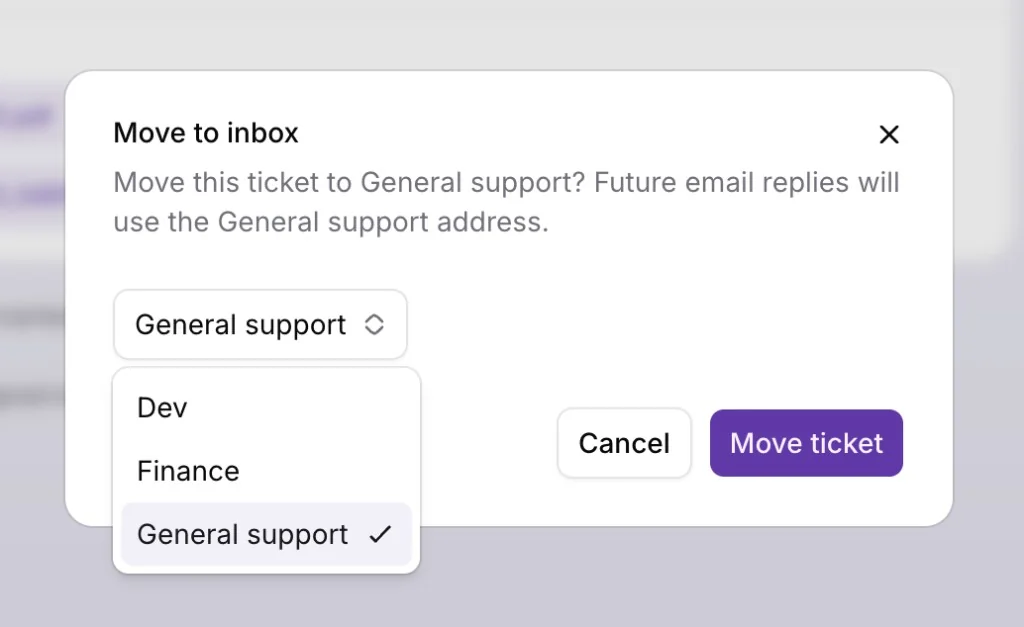
Open a ticket, choose Move to inbox from the actions menu, pick the destination inbox, and confirm. The ticket keeps its full history, assignee, tags, and status — only the inbox it belongs to changes.
For email tickets, you can move to any other inbox you have access to. Future replies go out from the destination inbox address, so customers continue the same thread under the correct team or brand. For Telegram and other channel tickets, initdesk only shows inboxes with an active connection for that channel, so the conversation stays on the same channel after the move.
This is especially useful when a customer reaches the wrong inbox, when you reorganize teams, or when you want billing, product, and general support to each own their queue without starting a new ticket.
Move to inbox modal showing destination inbox dropdown with Dev, Finance, and General support options
New Feature

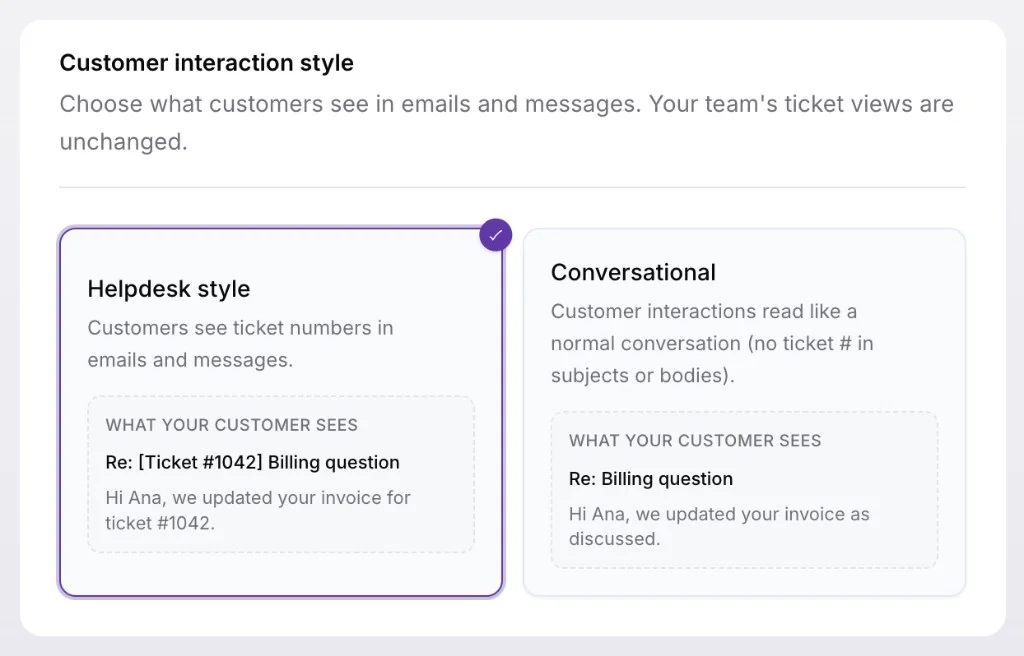
Define customer interaction style per inbox

You can now choose how each inbox formats customer-facing emails and messages, so support can feel like a helpdesk for some teams and a normal conversation for others.
Go to Settings > Inboxes, open an inbox, and pick a style under General > Customer interaction style. Use Helpdesk style when customers should see ticket references in subjects and replies, or Conversational when you want interactions to read like everyday email without ticket numbers in what they receive.
The setting is per inbox, so one organization can keep a formal helpdesk flow for billing while a product inbox stays conversational. Your team's ticket views and workflows stay the same: only what customers see in outbound emails and messages changes.
Customer interaction style setting showing Helpdesk style and Conversational options with previews of what customers see in email subjects and bodies
New Feature

Chat bot can now create tickets

The support portal chat bot can now turn conversations into tickets when human follow-up is needed.
If a customer needs help beyond the bot response, or the AI bot cannot answer their question, the bot escalates the request to a ticket.
Your team picks up in the inbox with a summarized chat, so Live chat becomes a clear path from self-serve answers to human support when the widget alone is not enough.
Enhancement

Two-way status sync with Linear

Tracked tickets are now updated automatically when the linked Linear issue is marked as done.
When a Linear issue reaches a done status, initdesk syncs the related ticket to Pending associate and moves it to Needs response (the retired Focused tab), so your team knows it is time to follow up with the customer.
This closes the loop between product work in Linear and customer follow-up in initdesk without manual status checks.
initdesk ticket in the Focused tab after a linked Linear issue sync updates the ticket to Pending associate status
New Feature

Custom sender names per inbox

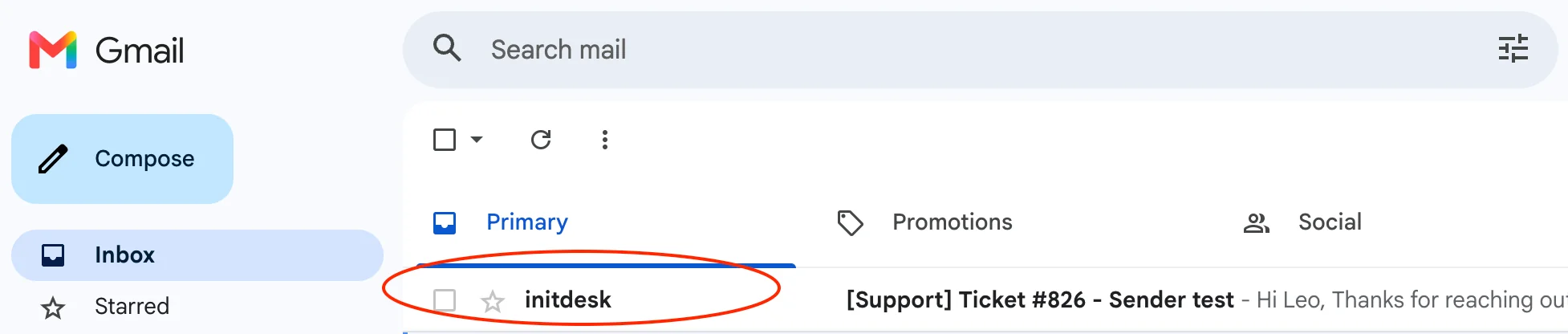
You can now choose the sender name for each inbox, so replies show the right team or brand in your customer's email client instead of a generic default.
Go to Settings > Inboxes > Channels > Email settings and set the sender name for that inbox. Each inbox can use its own name, which helps when different teams or products share one initdesk organization.
The sender name applies to outbound tickets and replies from that inbox, so customers see a familiar From line in their inbox.
Email settings for an inbox showing a custom sender name field for how replies appear in the customer email client
New Feature

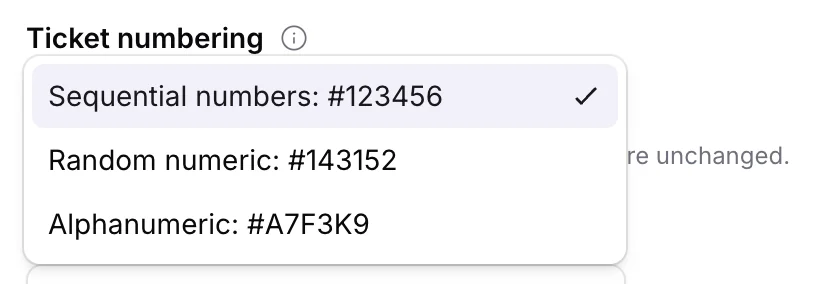
Ticket numbering

You can now choose how ticket references appear in emails and conversations. Go to Settings > General and pick the format that fits your team.
Use sequential numbers for simple #1, #2, #3 references, random numeric references when you want IDs that are harder to guess, or alphanumeric references when you want a mixed letter-and-number format.
The setting applies organization-wide, so new tickets follow the format you choose in subject lines, replies, and the inbox.
General settings page showing ticket numbering options for sequential numbers, random numeric references, and alphanumeric references
New Feature

Telegram channel

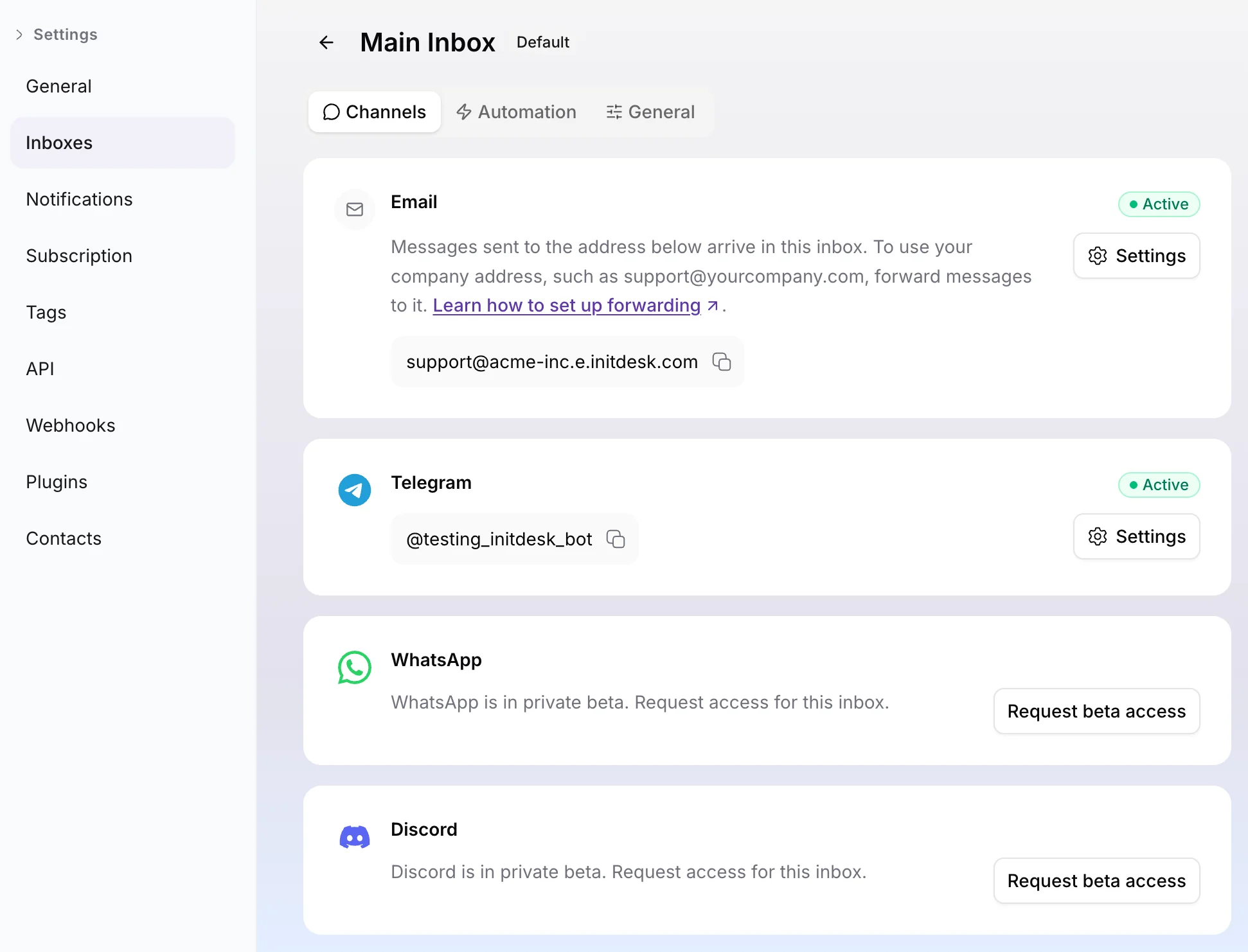
initdesk inboxes now support Channels, starting with Telegram, so teams can manage Telegram conversations from the same place they already handle email support.
Inboxes are no longer limited to a single email entry point. Each inbox now has a Channels area where you can review connected channels, keep email active, and add new ways for customers to reach your team as they become available.
Go to Settings > Inboxes > Channels to connect Telegram to an inbox, or read how Channels work before setting up your first channel.
Inbox Channels settings page showing Email and Telegram as active channels, with WhatsApp and Discord beta access options
New Feature

Notification preferences

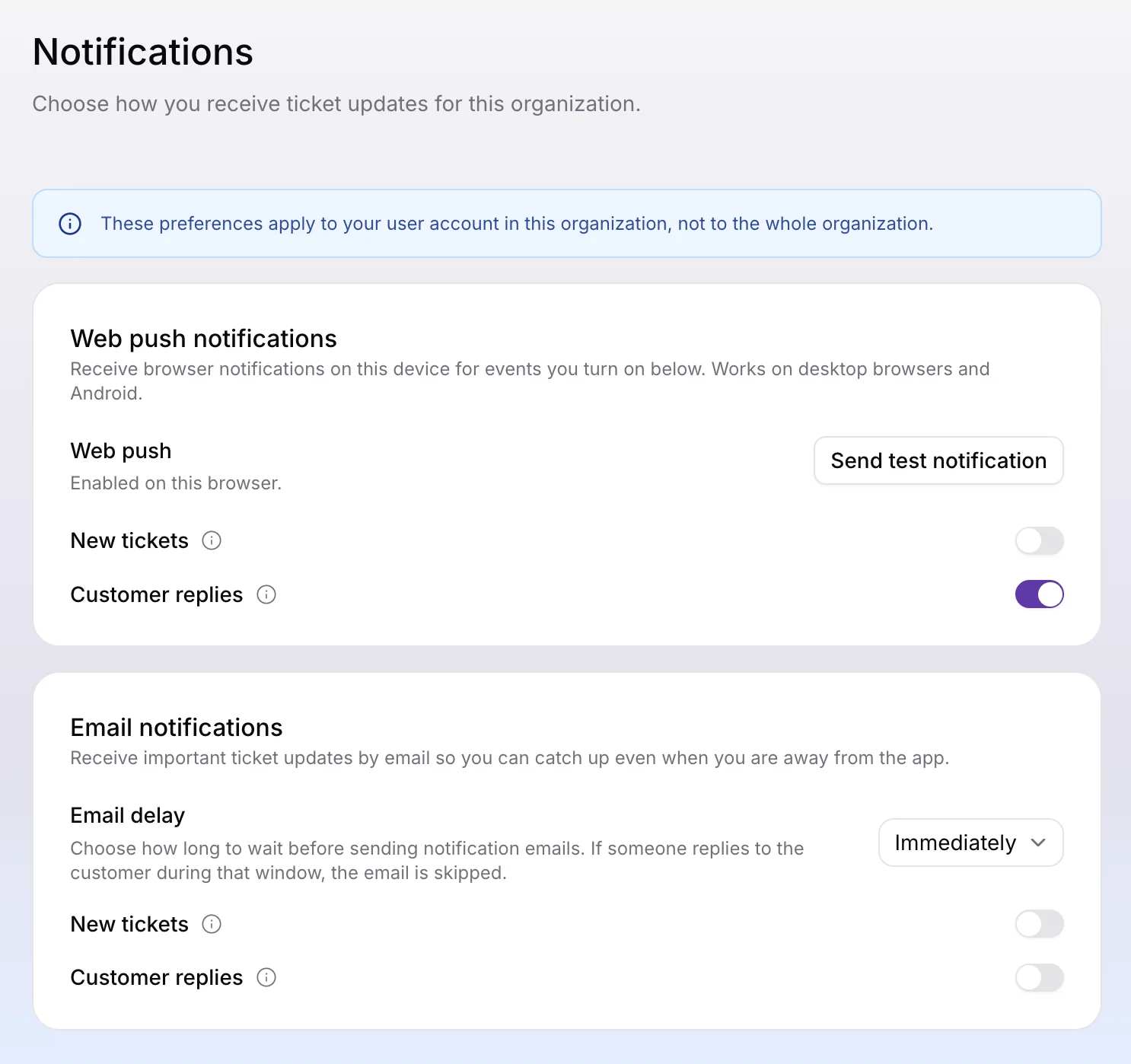
Each teammate can now choose how they receive ticket updates in Settings > Notifications, so alerts match the way they work instead of relying on one organization-wide setting.
You can turn on email and/or push notifications for new tickets and customer replies, and choose how long initdesk should wait before sending notification emails.
Push notifications work in supported desktop browsers, Android, and iOS. To receive mobile notifications, save https://app.initdesk.com to your home screen first.
Notifications settings page with web push and email notification preferences for new tickets and customer replies
New Feature

initdesk API

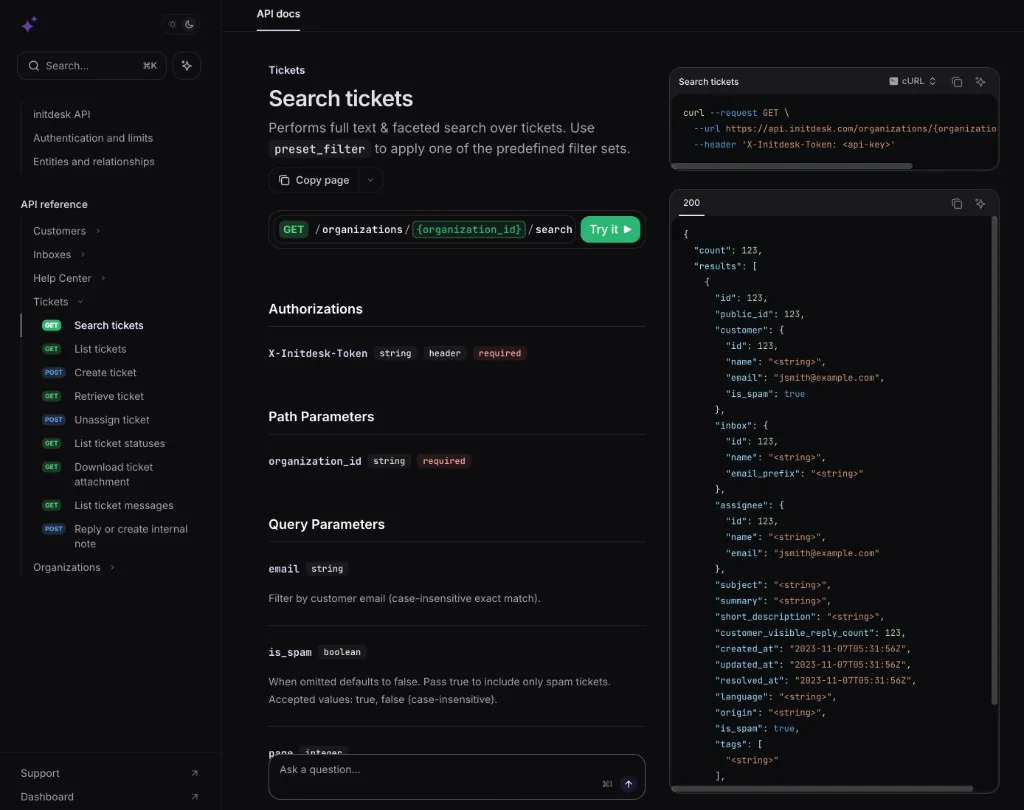
The initdesk API is live today. Your systems can call initdesk at https://api.initdesk.com to create and manage tickets, customers, messages, and Help Center content from CRMs, internal tools, and custom portals.
Developer docs are at developers.initdesk.com. Authenticate with an organization token from Settings → API access (X-Initdesk-Token on every request). Use the numeric organization ID from Settings → General in paths like /organizations/{organization_id}/.
What you can do now:
  • Tickets: list, search, create, retrieve, reply, and read message threads
  • Customers and inboxes: manage requesters and route new tickets to the right inbox
  • Help Center: publish and sync articles and collections from your own pipeline
  • OpenAPI: explore and generate clients from api.initdesk.com/schema.yaml
This is different from BYOD (initdesk calls your endpoint for sidebar context) and webhooks (initdesk pushes events to your URL). Many teams combine all three. See API, webhooks, or BYOD for when to use each.
initdesk API documentation showing Search tickets with curl example and response schema
New Feature

Push notifications

initdesk now supports push notifications for new tickets, so your team can see incoming customer conversations faster without keeping the inbox open all day.
When enabled, initdesk can show new ticket notifications on supported desktop browsers and Android devices. Each organization controls its own setting, so teams can choose where push alerts should be active.
Go to Settings > General > Enable new ticket notifications to turn it on for your organization.
Browser push notification from initdesk showing a new ticket alert
New Feature

Help Center analytics

See what customers actually do on your Help Center and Live chat widget. The new Help Center analytics dashboard shows views, searches, chat submits, and widget sessions for any period you choose.
Spot your busiest articles, the searches that return nothing, and where self-service is working before tickets pile up. Go to Sidebar menu > Insights in initdesk to review top paths and search terms for your organization.
Help Center analytics dashboard with summary metrics for views, searches, chat submits, and widget sessions, plus top paths and top search terms tables
Enhancement

Help Center in seven languages

Your public Help Center and Live chat widget now show built-in UI text in seven locales. Navigation, search labels, feedback prompts, and widget chrome follow the visitor's language when a supported locale is available.
Supported locales:
  • en (English)
  • es (Spanish)
  • pt-BR (Portuguese, Brazil)
  • nl (Dutch)
  • fr (French)
  • de (German)
  • it (Italian)
You still publish articles in the languages you choose. This update covers the Help Center interface around your content.
Enhancement

Fine-grained events for Slack and webhooks

Slack notifications and webhooks now let you choose exactly which ticket events should trigger a message or delivery—so your channels and endpoints stay focused on what matters.

What's New

The following events are now available:
  • Ticket created
  • Ticket status changed
  • Ticket assignee changed
  • Customer replied
  • Teammate replied
  • System replied
  • Internal note added
  • Ticket resolved
Pick the events you care about when you set up or edit a webhook, and use the same controls in your Slack integration.
Create New Webhook dialog with endpoint URL, optional description, selectable ticket events, and template dropdown