
Predefined inbox filters for small teams
Filters raise productivity and support quality by making the inbox dynamic: one click separates what's yours, what's unclaimed, and what's waiting on the customer.
Filters raise productivity and support quality because they make the inbox dynamic: one click separates what is yours, what nobody has claimed, and what is already with the customer, without rebuilding the same search every morning. Small teams need that clarity day to day. A short filter row, aligned with real triage, keeps ownership explicit and decides where you start when you open the inbox.
A custom preset filter is a saved ticket search pinned to the inbox filter row: named criteria you click instead of rebuilding Assignee, Waiting-on, and Status filters every time.
initdesk replaced the fixed Focused, Waiting Customer, and Closed tabs with customizable organization-shared filters. Every org starts with a predefined set you can rename, reorder, edit, or delete, and you can add personal filters beside them.
See the product update for what shipped.
The predefined filters
They arrive as org-shared presets (editable and deletable). Untouched predefined names follow the interface language; after you rename one, your custom label sticks.
| Filter | What it shows |
|---|---|
| My queue | Assigned to you and waiting on an associate |
| Unassigned | No assignee and waiting on an associate |
| Needs response | Waiting on an associate (any assignee) |
| Waiting on customer | Waiting on the customer |
| Closed | Closed tickets |
My queue, Unassigned, Needs response, and Waiting on customer show a live ticket count by default. Closed does not, so a large archive does not steal attention from active work. Assignee, Tag, and Spam remain separate controls next to the preset row.
If you still think in terms of the old tab names: Focused splits into My queue, Unassigned, and Needs response. The old Waiting Customer tab becomes the Waiting on customer filter. Closed stays Closed, now as a real editable custom filter.
What opens first
Landing behavior is deliberate:
- Prefer My queue.
- If that search returns zero tickets, fall back to Needs response.
- If either filter was renamed or edited so the criteria no longer match the original predefined filter, treat it as a normal custom filter. There is no special fallback.
That pattern keeps you on work you own when you have it, then on anything still waiting on the team when your personal queue is clear. It pairs well with first response norms for small teams: clear queues beat vague “everything in Focused” habits.
Personal vs organization-shared
The filter row has two bands:
- My filters first (personal: yours only).
- Shared next (organization-shared: the starting predefined filters live here, plus any views your admins publish).
Reorder only within the same band. Dragging a personal filter into the shared band (or the reverse) isn't how reordering works: publish or demote visibility when you mean to move a filter between bands. Creating, editing, deleting, and reordering organization-shared filters is reserved for admins and owners. Personal filters are managed by the associate who created them.
Use personal filters for your own rituals. For example, create a Bug reports view with visibility Personal, include the
bug tag, and turn on Show ticket count so matching tickets stay one click away without changing what the rest of the team sees.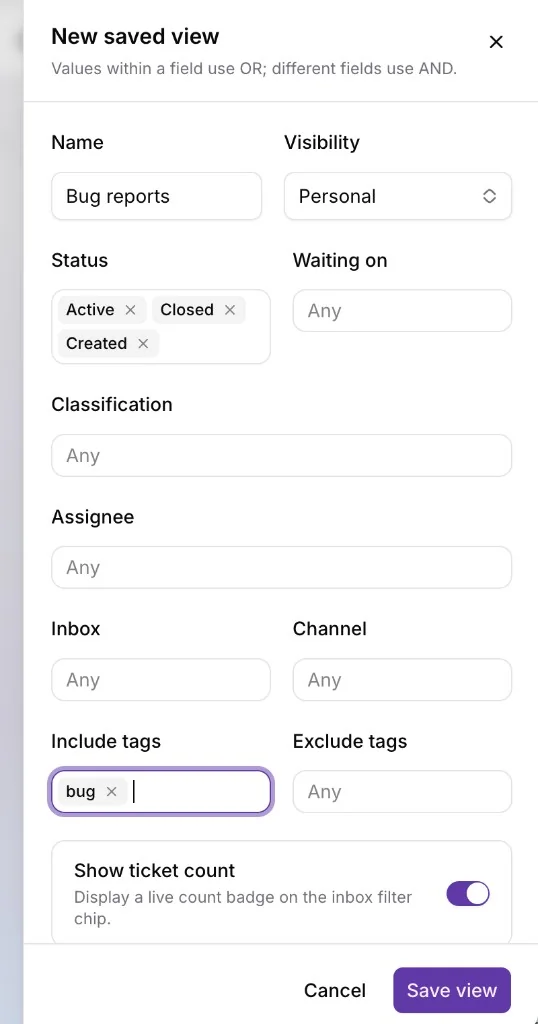
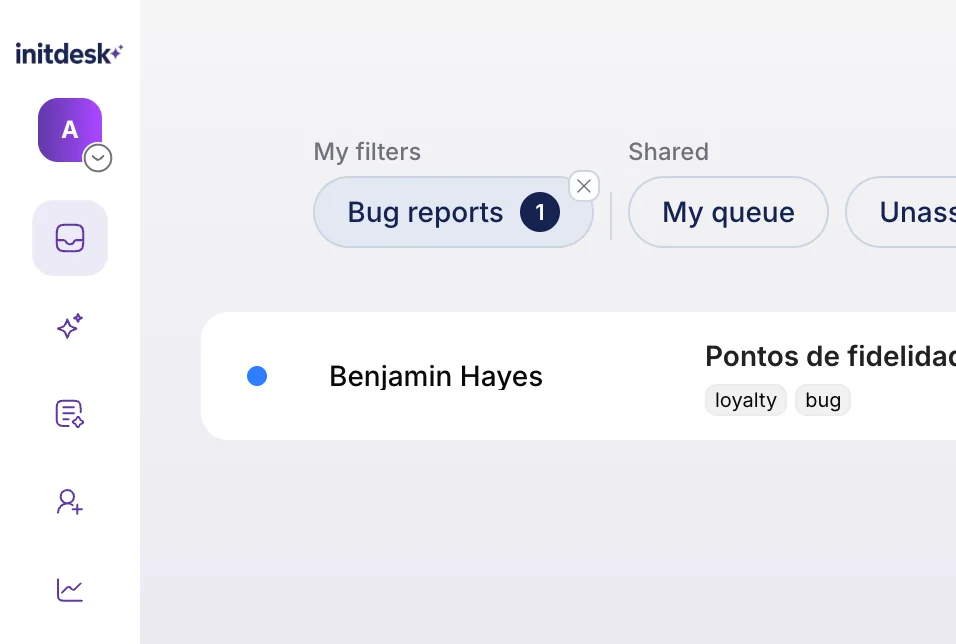
In the inbox, that personal tab appears under My filters, with the shared predefined filters (such as My queue) beside it under Shared.
Use org-shared filters for the team’s common language so everyone means the same thing by “needs response” or “waiting on customer.”
Monday-morning checklist
When you sit down:
- Open the inbox and start from My queue. Clear what is yours and waiting on you.
- If My queue is empty, you should already be on Needs response. Work the shared backlog, or claim from Unassigned so ownership is explicit.
- Flip to Waiting on customer for nudges on stale threads still waiting on the customer (the same follow-up idea as the older Waiting Customer tab, now as a renamable filter).
- Use Closed when you need history, not as part of your daily workload.
- Keep personal filters for your niche views; leave the shared predefined filters as the team’s map unless you have a better org-wide naming scheme.
Clean handoffs still matter when work moves between people. Pair these views with the pattern in Hand off a support thread without losing the customer.
Start with the predefined filters, then rename with intent
Keep the starting predefined filters for about a week before you rename them. Learn which counts you trust, who owns Unassigned, and whether My queue → Needs response matches how you actually start the day. Then rename labels to match your language, turn off counts where they add noise, and add personal filters only for views you alone need.
The filter row should be answerable at a glance: what is mine, what is unowned, what is waiting on us, what is waiting on the customer, and where closed history lives when you need it.