
Mauvais client sur un ticket e-mail ? Corrigez le demandeur sans perdre le fil
Les transferts de collègues et les boîtes partagées collent souvent la mauvaise personne comme demandeur. Réattribuez le client sur un ticket e-mail, gardez toute la conversation, et restez honnête avec les plugins et l’accès portail.
Un collègue transfère l’e-mail d’un client vers le support. Votre adresse de boîte partagée devient le « client ». Quelqu’un d’autre dans le fil se retrouve lié comme demandeur (client) pendant le premier triage. Les messages sont bons ; l’identité est fausse.
Le demandeur est le client auquel appartient le ticket en ce moment : la personne que suit l’adresse À de la réponse, celle que les plugins et l’historique récent utilisent, et (si le libre-service est activé) celle qui peut ouvrir le fil dans le portail. Tant que vous ne corrigez pas une mauvaise liaison, tout cela suit la mauvaise personne. Recréer le ticket jette le contexte. Changer le demandeur garde le fil et corrige la propriété.
Pourquoi la mauvaise personne reste collée
Les tickets e-mail héritent de l’identité selon comment le courrier est arrivé ou qui a été choisi à la création. Modes d’échec courants :
- Un collègue transfère le message d’un client, et le collègue (ou une adresse générique) devient le demandeur.
- Une adresse de boîte de réception partagée est traitée comme le client au lieu de la personne qui a besoin d’aide.
- Le mauvais contact est choisi à la rédaction ou pendant les premières minutes de triage.
Cette liaison est volontairement collante : les tickets ont besoin d’un client stable. Le coût, c’est qu’une erreur de routage ponctuelle peut mal attribuer toute la conversation jusqu’à ce que quelqu’un la corrige.
Ce que fait Modifier le demandeur
Sur un ticket e-mail, les agents ayant accès à la boîte de réception du ticket peuvent ouvrir ⋯ Actions (en haut à droite de l’écran du ticket) et choisir Modifier le demandeur. Ce n’est pas disponible sur les organisations en essai : contactez le support si vous en avez besoin pendant un essai.
Ce qui se passe :
- Le demandeur actif du ticket est relié à un autre client (existant, trouvé par e-mail, ou créé avec e-mail + nom).
- Toute la conversation reste : vous ne clonez ni ne fermez le ticket.
- Une note système interne enregistre le changement pour l’audit.
- L’interface dépendante du client actuel se met à jour : barre latérale, plugins, tickets récents et adresse À de la réponse.
- Si votre organisation a le routage Cc activé, vous pouvez optionnellement garder l’ancien demandeur en Cc (décoché par défaut).
Pensez en termes de qui possède ce ticket maintenant, pas d’en-têtes From figés à la création.
Comment corriger
- Ouvrez un ticket e-mail.
- Ouvrez le menu ⋯ Actions en haut à droite de l’écran du ticket.
- Choisissez Modifier le demandeur.
- Vérifiez le résumé du demandeur actuel.
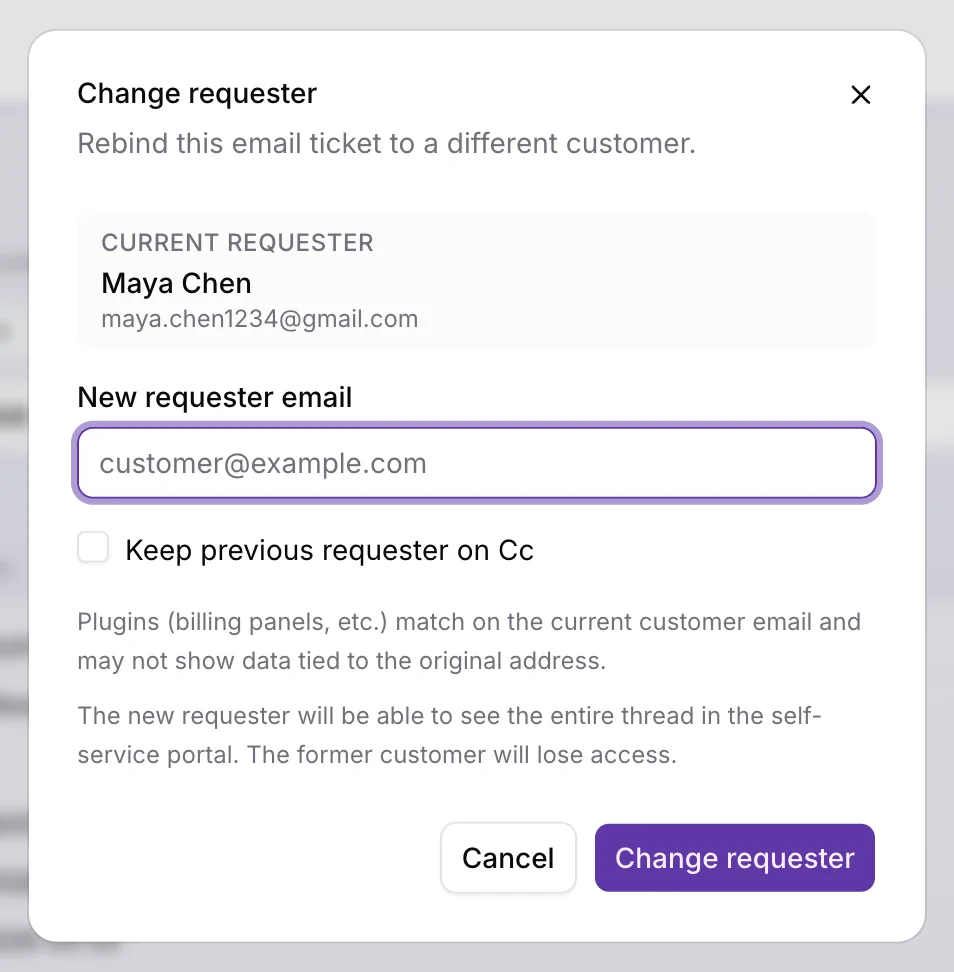
- Saisissez le nouvel e-mail du demandeur (tapez-le ou choisissez parmi les suggestions de clients).
- Si l’e-mail est un nouveau client, renseignez le champ Nom obligatoire.
- Si le routage Cc est activé, décidez d’activer ou non Conserver le demandeur précédent en Cc.
- Lisez les avertissements à l’écran, puis confirmez Modifier le demandeur.
Après succès, le ticket se rafraîchit avec le nouveau client, la note d’audit apparaît dans la chronologie, les plugins et tickets récents suivent la nouvelle identité, et les champs À / Cc du compositeur se réinitialisent à partir des destinataires mis à jour.
Voir la mise à jour produit sur le changement de demandeur pour la note de version.
Avant de confirmer : trois pièges
| Point d’attention | À quoi s’attendre |
|---|---|
| Plugins | Les barres latérales liées à l’e-mail du client actuel (facturation, CRM, données custom) se rafraîchissent pour la nouvelle identité : les données de l’ancienne adresse peuvent disparaître du panneau. |
| Portail en libre-service | Le nouveau demandeur obtient l’accès portail à tout le fil ; l’ancien le perd. Prévenez les collègues avant de surprendre l’une ou l’autre partie. |
| Canal | L’action est e-mail uniquement. Elle est masquée sur Telegram et les autres canaux hors e-mail. |
Aussi : si vous devez seulement corriger une faute dans le nom d’affichage sans changer d’identité, éditez la fiche client au lieu de changer le demandeur.
Identité correcte, histoire intacte
Les tickets e-mail mal attribués sont une friction d’ops ordinaire, pas une raison de reconstruire l’historique. Changez le demandeur quand la mauvaise personne est collée au ticket, gardez le fil, et traitez plugins et accès portail comme partie de la décision, pas comme une réflexion après coup.
Pour des flux liés, voir Passer un fil de support sans perdre le client (propriété côté agent) et Un libre-service qu’on utilise vraiment (habitudes de portail). Plus de notes produit sur Mises à jour.